Removing an Old Mobile Device
Removing an old mobile device is used when a user has reached the allowed device limit or no longer has access to one of their devices.
This action is performed exclusively in the AuditBLOOM web version.
Important to Know
- Each user is allowed no more than 2 active mobile devices
- An old device can be removed no more than once per month
- After removal, the device automatically loses access to the mobile app
- Signing in again from this device will not be possible without re-authorization
Please Note
The mobile app does not provide device management functionality. All device-related actions are performed only through the web interface.
When You Need to Remove a Device
Removing an old device may be required in the following cases:
- You have changed your phone
- The device was lost or damaged
- Access to the old device is no longer needed
- The limit of 2 mobile devices has been reached
How to Remove an Old Device
Step 1. Sign In to the AuditBLOOM Web Version
- Open the AuditBLOOM web version in your browser
- Sign in with your user account
Step 2. Go to Profile Settings
- Open the user profile menu
- Go to the Mobile Devices section
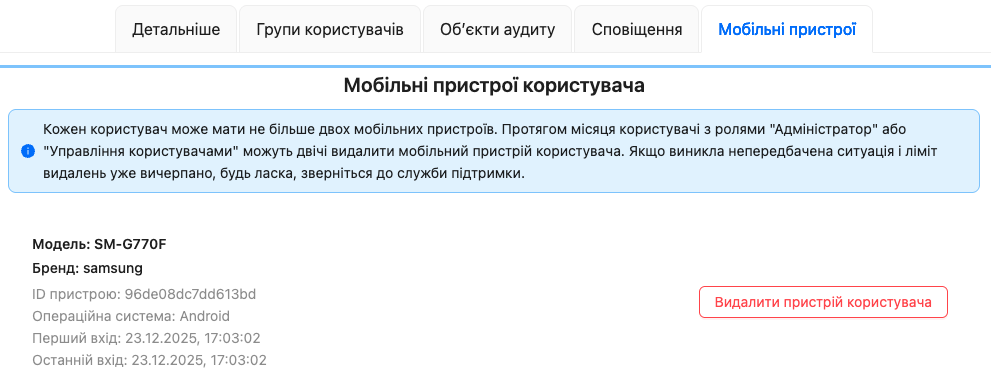
Step 3. Remove the Old Device
- In the list of connected mobile devices, find the one you want to remove
- Click the Remove button
- Confirm the action
What Happens After Removal
- The removed device loses access and will no longer be able to submit audits
- You will be able to add a new mobile device on your next sign-in
Restrictions and Rules
Good to Know
- Plan device removals in advance — the limit applies once per month
- Removing a device does not affect your scheduled audits, tasks, or data
Frequently Asked Questions
Can a device be removed from the mobile app?
No. Device management is available only in the web version.
Can a removed device be restored?
No. You must sign in again in the mobile app to add it back.
What should I do if the limit is reached and the device is lost?
It is recommended to contact customer support.