Overdue Audits
Overdue Audits are audits whose deadlines have passed but were not started or canceled. The AuditBLOOM system includes a dedicated "Overdue Audits" tab that displays all such audits, helping to monitor and analyze uncompleted inspections.
Accessing Overdue Audits
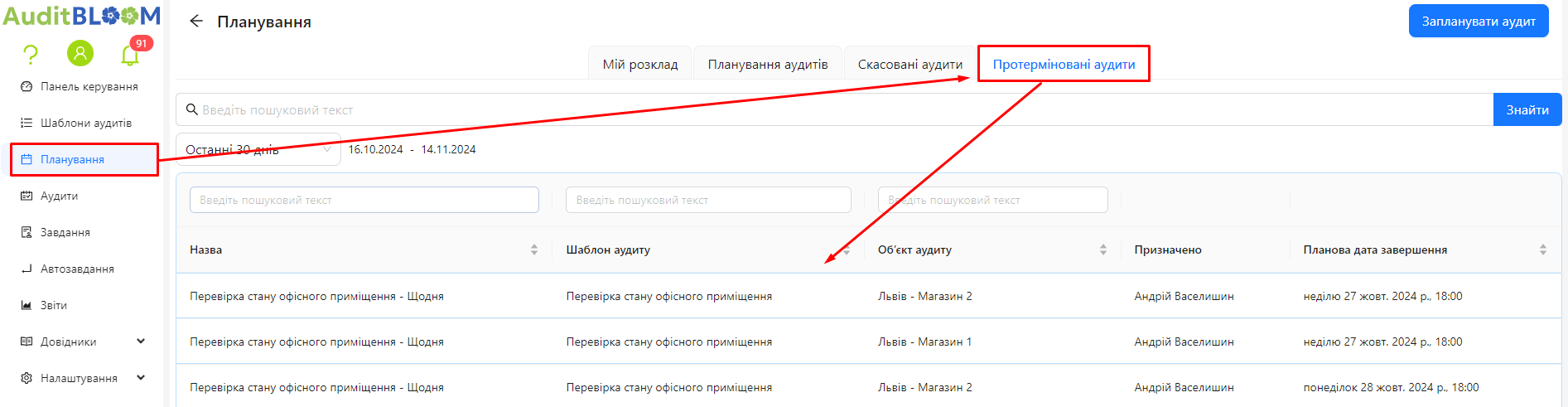
Step 1: Open the "Overdue Audits" Tab
-
Log into the system with your account.
-
In the main menu, select the "Planning" section.
-
In the "Planning" section, choose the "Overdue Audits" tab.
Step 2: Review the List of Overdue Audits
-
The list contains all audits that:
- Are overdue: The deadline has passed.
- Not started: The audit was not initiated by the user.
- Not canceled: The audit was not marked as canceled.
-
Audit information includes:
- Audit name.
- Audit template.
- Audit object.
- Assigned to - the user responsible for completing the audit.
- Planned completion date: The date and time by which the audit was supposed to be finished.
Step 3: Actions for Overdue Audits
-
Click on the record of an overdue audit to view its details.
-
A window will open with information and available actions:

Notes and Tips
Notes and Tips
- Monitoring overdue audits: Administrators and managers can use this tab to control audit execution and identify problem areas.
- Timely response: Overdue audits may indicate the need to review schedules or resources.