Current Audits Tab
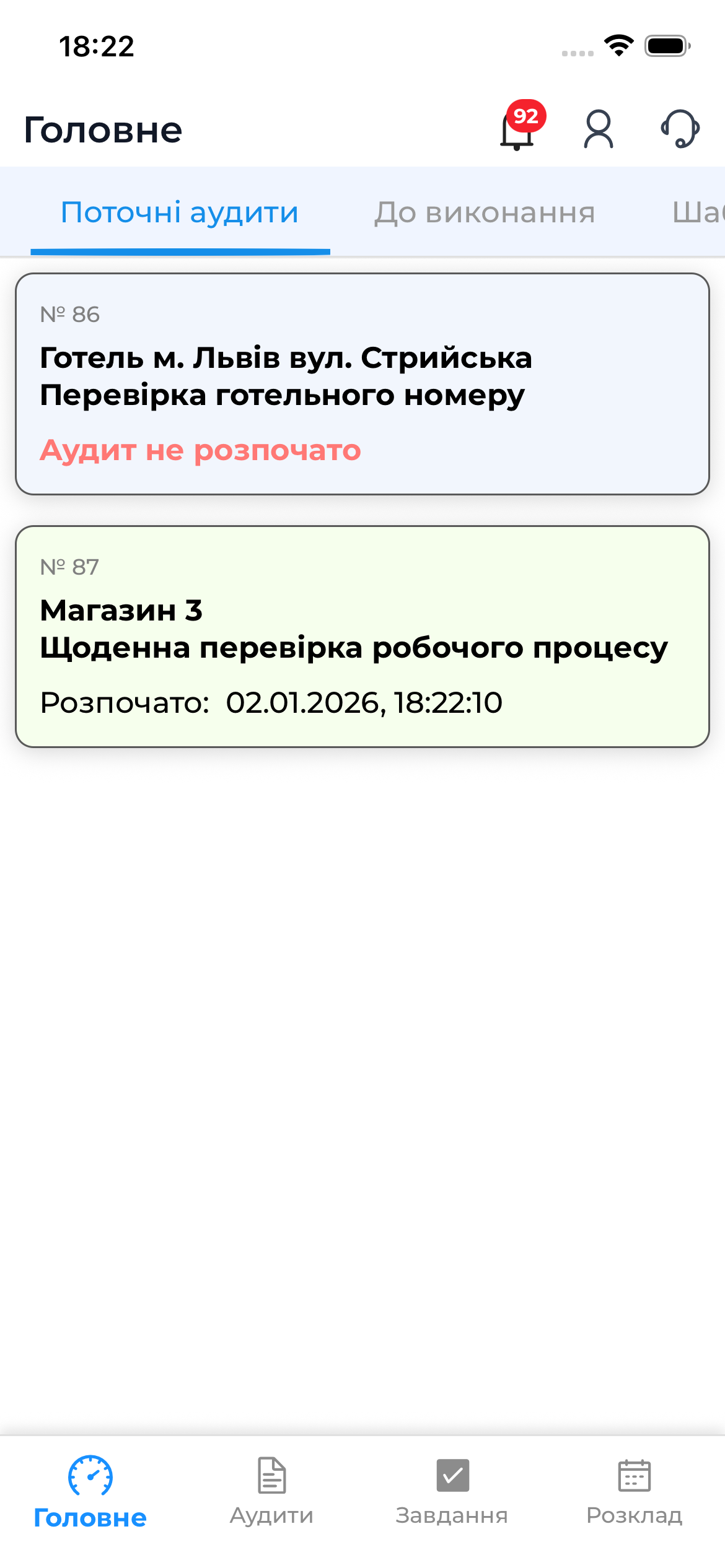
The “Current Audits” tab displays all audits that the user is currently working on in the mobile app. It is the central place for monitoring active audits and quickly accessing their execution.
The tab is available in the “Home” section of the app’s bottom menu.

Which Audits Are Displayed
The “Current Audits” list includes:
- Prepared audits that have not yet been started
- Audits in progress
- Audits that are completed but not yet sent to the server
These are only the audits that the user is directly working on or plans to work on in the near future.
Information Shown in the Audit List
For each audit in the list, the following information is displayed:
- audit or template name
- audit object
- audit status (prepared / in progress)
- execution date or context
This information helps you quickly orient yourself and select the required audit.
Navigating to Audit Execution
By tapping an audit in the list, you can:
- start the audit, if it has not yet been completed
- continue the audit, if it was started earlier
- delete the audit
Helpful Tips
Notes and Tips
- It is recommended to prepare audits in advance if you plan to work without internet access
- If an audit disappears from the list, check whether it has been completed or synchronized